Python ReportLab으로 만드는 한글 지원 PDF 인보이스

혹시 ReportLab으로 PDF 코드를 작성하다가 포기하신 경험이 있으신가요? 오늘은 브라우저에서 바로 만들고 테스트할 수 있는 차니툴즈 PDF Builder를 위한 특별한 템플릿 코드를 소개해 드립니다. 이 코드는 Python의 ReportLab 라이브러리를 활용하여 한글이 완벽하게 지원되는 깔끔한 디자인의 PDF 인보이스를 생성해 줍니다. PDF 문서 자동화가 필요한 개발자나 보고서, 인보이스 등 정형화된 문서 작성이 잦은 비즈니스 사용자들이 매번 수동으로 문서를 만드는 번거로움에서 벗어날 수 있도록 제작되었습니다.
이 템플릿은 기업 인보이스에 최적화되어 전문적이고 신뢰성 있는 분위기를 연출합니다. 'Pretendard' 폰트를 적용하여 한글 텍스트가 깨지지 않고 깔끔하게 출력되며, 품목의 수량과 단가에 따라 소계, 부가세, 총금액이 자동으로 계산되는 편리한 기능도 포함하고 있습니다. 최대 5개 품목까지 입력할 수 있으며, 데이터가 없으면 빈 행으로 처리되어 깔끔한 레이아웃을 유지합니다. 또한, 청구서 번호, 발행일, 결제 기한, 발송자와 수신자 정보, 결제 조건 등 인보이스에 필수적인 모든 정보를 담을 수 있도록 구성되었습니다. 무엇보다 billData 딕셔너리에 데이터를 넣는 방식으로, 코드를 직접 수정하지 않고도 내용을 손쉽게 변경할 수 있어 사용이 간편합니다. 이 코드를 활용하면 이미지와 같은 전문적인 PDF 인보이스를 손쉽게 만들 수 있으니, 지금 바로 차니툴즈 PDF Builder에서 이 코드를 활용해 보세요!
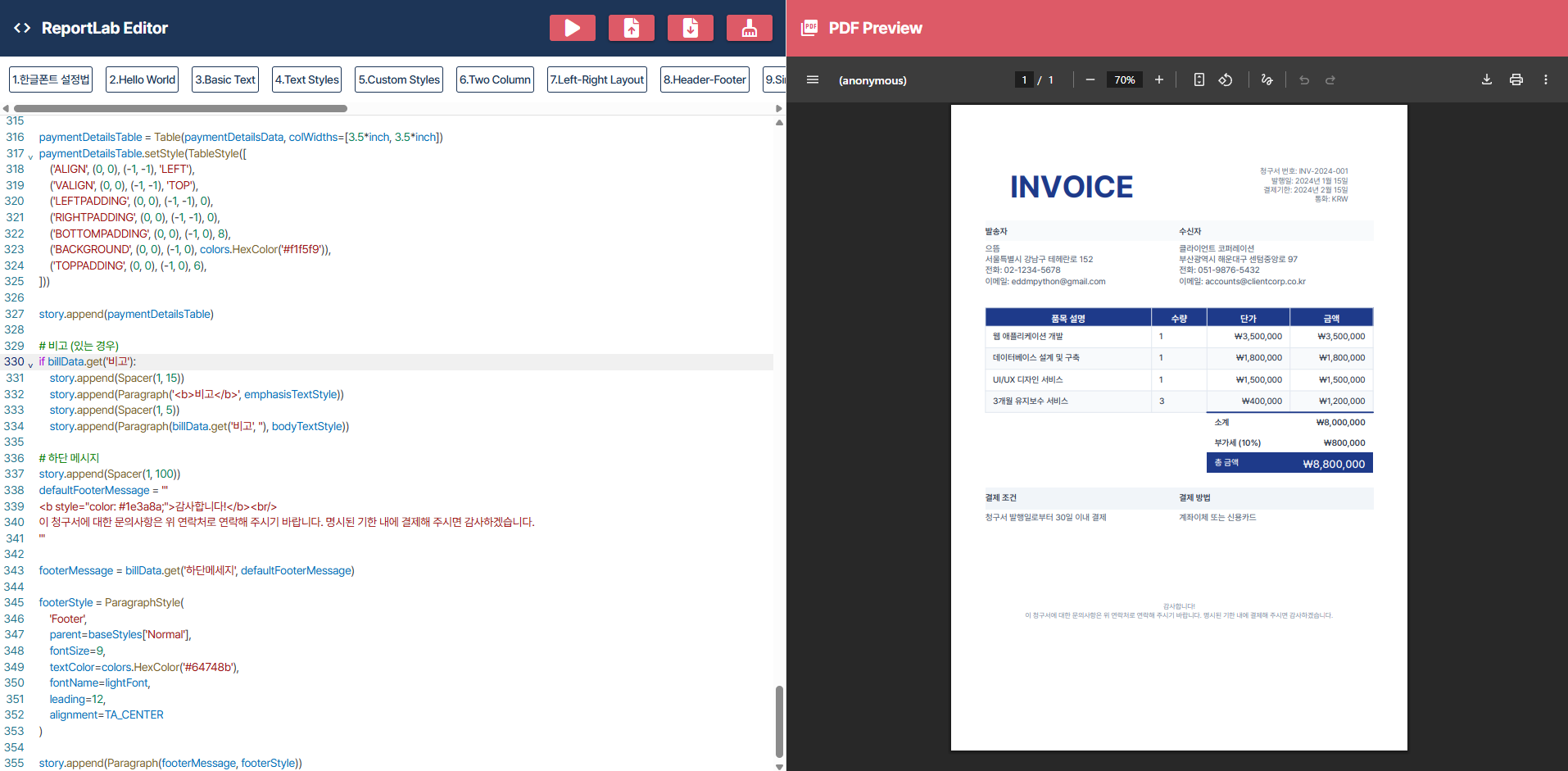
reportlab PDF 생성 템플릿 에디터
"reportlab 코드 작성하다가 포기했나요?" 브라우저에서 바로 만들고 테스트하세요 업무 자동화...
blog.naver.com
from reportlab.lib.pagesizes import A4
from reportlab.platypus import SimpleDocTemplate, Table, TableStyle, Paragraph, Spacer
from reportlab.lib.styles import getSampleStyleSheet, ParagraphStyle
from reportlab.lib.units import inch
from reportlab.lib import colors
from reportlab.lib.enums import TA_LEFT, TA_CENTER, TA_RIGHT
from io import BytesIO

# 청구서 데이터 (빈 딕셔너리로 시작 - 기본값들이 사용됨)
billData = {}

# 폰트 설정(Pretendard코드가 등록되어있다고 가정함)
mainFont = 'Pretendard-Regular'
boldFont = 'Pretendard-Bold'
lightFont = 'Pretendard-Light'
mediumFont = 'Pretendard-Medium'

# 기본 스타일 설정
baseStyles = getSampleStyleSheet()

# 커스텀 스타일 정의
invoiceHeaderStyle = ParagraphStyle(
    'InvoiceHeader',
    parent=baseStyles['Heading1'],
    fontSize=40,
    textColor=colors.HexColor('#1e3a8a'),
    fontName=boldFont,
    alignment=TA_LEFT,
    spaceAfter=12,
    letterSpacing=3
)

companyTitleStyle = ParagraphStyle(
    'CompanyTitle',
    parent=baseStyles['Normal'],
    fontSize=16,
    textColor=colors.HexColor('#1e293b'),
    fontName=boldFont,
    spaceAfter=8
)

bodyTextStyle = ParagraphStyle(
    'BodyText',
    parent=baseStyles['Normal'],
    fontSize=11,
    textColor=colors.HexColor('#475569'),
    fontName=mainFont,
    leading=14
)

emphasisTextStyle = ParagraphStyle(
    'EmphasisText',
    parent=baseStyles['Normal'],
    fontSize=11,
    textColor=colors.HexColor('#1e293b'),
    fontName=mediumFont,
    leading=14
)

tableHeaderTextStyle = ParagraphStyle(
    'TableHeaderText',
    parent=baseStyles['Normal'],
    fontSize=12,
    textColor=colors.white,
    fontName=boldFont,
    alignment=TA_CENTER
)

tableCellTextStyle = ParagraphStyle(
    'TableCellText',
    parent=baseStyles['Normal'],
    fontSize=11,
    textColor=colors.HexColor('#1e293b'),
    fontName=mainFont,
    leading=16
)

headerInfoStyle = ParagraphStyle(
    'HeaderInfo',
    parent=baseStyles['Normal'],
    fontSize=10,
    textColor=colors.HexColor('#475569'),
    fontName=lightFont,
    leading=12,
    alignment=TA_RIGHT
)

# story 리스트 초기화 (PDF Builder가 인식할 수 있도록 맨 앞에 배치)
story = []

# 청구서 헤더
invoiceHeaderData = [
    [
        Paragraph('<b>INVOICE</b>', invoiceHeaderStyle),
        Paragraph(f'''
            <b>청구서 번호:</b> {billData.get('청구서번호', 'INV-2024-001')}<br/>
            <b>발행일:</b> {billData.get('발행일', '2024년 1월 15일')}<br/>
            <b>결제기한:</b> {billData.get('결제기한', '2024년 2월 15일')}<br/>
            <b>통화:</b> {billData.get('통화', 'KRW')}
        ''', headerInfoStyle)
    ]
]

invoiceHeaderTable = Table(invoiceHeaderData)
invoiceHeaderTable.setStyle(TableStyle([
    ('ALIGN', (0, 0), (0, 0), 'LEFT'),
    ('ALIGN', (1, 0), (1, 0), 'RIGHT'),
    ('VALIGN', (0, 0), (-1, -1), 'TOP'),
    ('LEFTPADDING', (0, 0), (-1, -1), 0),
    ('RIGHTPADDING', (0, 0), (-1, -1), 0),
]))

story.append(invoiceHeaderTable)
story.append(Spacer(1, 20))

# 발송자/수신자 정보
senderCompanyInfo = f'''
    <b>{billData.get('발송자회사명', '으뜸')}</b><br/>
    {billData.get('발송자주소', '서울특별시 강남구 테헤란로 152')}<br/>
    <b>전화:</b> {billData.get('발송자전화번호', '02-1234-5678')}<br/>
    <b>이메일:</b> {billData.get('발송자이메일', 'eddmpython@gmail.com')}
'''

receiverCompanyInfo = f'''
    <b>{billData.get('수신자회사명', '클라이언트 코퍼레이션')}</b><br/>
    {billData.get('수신자주소', '부산광역시 해운대구 센텀중앙로 97')}<br/>
    <b>전화:</b> {billData.get('수신자전화번호', '051-9876-5432')}<br/>
    <b>이메일:</b> {billData.get('수신자이메일', 'accounts@clientcorp.co.kr')}
'''

companyInfoData = [
    [
        Paragraph('<b>발송자</b>', emphasisTextStyle),
        Paragraph('<b>수신자</b>', emphasisTextStyle)
    ],
    [
        Paragraph(senderCompanyInfo, bodyTextStyle),
        Paragraph(receiverCompanyInfo, bodyTextStyle)
    ]
]

companyInfoTable = Table(companyInfoData, colWidths=[3.5*inch, 3.5*inch])
companyInfoTable.setStyle(TableStyle([
    ('ALIGN', (0, 0), (-1, -1), 'LEFT'),
    ('VALIGN', (0, 0), (-1, -1), 'TOP'),
    ('LEFTPADDING', (0, 0), (-1, -1), 0),
    ('RIGHTPADDING', (0, 0), (-1, -1), 0),
    ('BOTTOMPADDING', (0, 0), (-1, 0), 12),
    ('BACKGROUND', (0, 0), (-1, 0), colors.HexColor('#f8fafc')),
    ('TOPPADDING', (0, 0), (-1, 0), 6),
    ('BOTTOMPADDING', (0, 0), (-1, 0), 6),
]))

story.append(companyInfoTable)
story.append(Spacer(1, 25))

# 품목 테이블 생성
itemsTableData = [
    [
        Paragraph('품목 설명', tableHeaderTextStyle),
        Paragraph('수량', tableHeaderTextStyle),
        Paragraph('단가', tableHeaderTextStyle),
        Paragraph('금액', tableHeaderTextStyle)
    ]
]

# 기본 품목 데이터
defaultInvoiceItems = [
    {'name': '웹 애플리케이션 개발', 'qty': 1, 'price': 3500000},
    {'name': '데이터베이스 설계 및 구축', 'qty': 1, 'price': 1800000},
    {'name': 'UI/UX 디자인 서비스', 'qty': 1, 'price': 1500000},
    {'name': '3개월 유지보수 서비스', 'qty': 3, 'price': 400000}
]

invoiceItems = []
totalItemAmount = 0

# 품목 데이터 처리
for itemIndex in range(1, 6):
    itemName = billData.get(f'품목{itemIndex}_명', defaultInvoiceItems[itemIndex-1]['name'] if itemIndex <= len(defaultInvoiceItems) else '')
    itemQuantity = billData.get(f'품목{itemIndex}_수량', defaultInvoiceItems[itemIndex-1]['qty'] if itemIndex <= len(defaultInvoiceItems) else 0)
    itemUnitPrice = billData.get(f'품목{itemIndex}_단가', defaultInvoiceItems[itemIndex-1]['price'] if itemIndex <= len(defaultInvoiceItems) else 0)

    if itemName and itemQuantity and itemUnitPrice:
        itemAmount = itemQuantity * itemUnitPrice
        totalItemAmount += itemAmount

        invoiceItems.append({
            'description': itemName,
            'quantity': itemQuantity,
            'unitPrice': itemUnitPrice,
            'amount': itemAmount
        })

# 우측 정렬 스타일
tableCellRightStyle = ParagraphStyle(
    'TableCellRight',
    parent=tableCellTextStyle,
    alignment=TA_RIGHT
)

# 품목 행 추가
for item in invoiceItems:
    itemsTableData.append([
        Paragraph(item['description'], tableCellTextStyle),
        Paragraph(str(item['quantity']), tableCellTextStyle),
        Paragraph(f"₩{item['unitPrice']:,}", tableCellRightStyle),
        Paragraph(f"₩{item['amount']:,}", tableCellRightStyle)
    ])

# 빈 행 추가 (최소 3행 보장)
emptyRowsCount = max(0, 3 - len(invoiceItems))
for _ in range(emptyRowsCount):
    itemsTableData.append([
        Paragraph('', tableCellTextStyle),
        Paragraph('', tableCellTextStyle),
        Paragraph('', tableCellTextStyle),
        Paragraph('', tableCellTextStyle)
    ])

# 합계 계산
emphasisRightStyle = ParagraphStyle(
    'EmphasisRight',
    parent=emphasisTextStyle,
    alignment=TA_RIGHT
)

itemsSubtotal = totalItemAmount
discountPercentage = billData.get('할인율', 0) / 100 if billData.get('할인율', 0) else 0
discountValue = itemsSubtotal * discountPercentage
afterDiscountAmount = itemsSubtotal - discountValue
taxPercentage = billData.get('세율', 10) / 100 if billData.get('세율') else 0.10
taxValue = int(afterDiscountAmount * taxPercentage)
grandTotal = afterDiscountAmount + taxValue

# 합계 행들
summaryTableData = [
    ['', '', Paragraph('<b>소계</b>', emphasisTextStyle), Paragraph(f'<b>₩{itemsSubtotal:,}</b>', emphasisRightStyle)],
]

if discountPercentage > 0:
    summaryTableData.append([
        '', '',
        Paragraph(f'<b>할인 ({billData.get("할인율", 0)}%)</b>', emphasisTextStyle),
        Paragraph(f'<b style="color: #dc2626;">-₩{int(discountValue):,}</b>', emphasisRightStyle)
    ])

if taxPercentage > 0:
    summaryTableData.append([
        '', '',
        Paragraph(f'<b>부가세 ({billData.get("세율", 10)}%)</b>', emphasisTextStyle),
        Paragraph(f'<b>₩{taxValue:,}</b>', emphasisRightStyle)
    ])

# 총액 스타일
totalAmountStyle = ParagraphStyle(
    'TotalAmount',
    parent=emphasisTextStyle,
    alignment=TA_RIGHT,
    textColor=colors.white,
    fontSize=14
)

totalLabelStyle = ParagraphStyle(
    'TotalLabel',
    parent=emphasisTextStyle,
    textColor=colors.white
)

summaryTableData.append([
    '', '',
    Paragraph('<b>총 금액</b>', totalLabelStyle),
    Paragraph(f'<b>₩{int(grandTotal):,}</b>', totalAmountStyle)
])

# 품목 테이블에 합계 행들 추가
itemsTableData.extend(summaryTableData)

# 최종 테이블 생성
finalItemsTable = Table(itemsTableData, colWidths=[3*inch, 1*inch, 1.5*inch, 1.5*inch])
finalItemsTable.setStyle(TableStyle([
    ('BACKGROUND', (0, 0), (-1, 0), colors.HexColor('#1e3a8a')),
    ('TEXTCOLOR', (0, 0), (-1, 0), colors.white),
    ('ALIGN', (0, 0), (0, -1), 'LEFT'),
    ('ALIGN', (1, 0), (1, -1), 'CENTER'),
    ('ALIGN', (2, 0), (-1, -1), 'RIGHT'),
    ('FONTNAME', (0, 0), (-1, -1), mainFont),
    ('FONTSIZE', (0, 0), (-1, -1), 11),
    ('ROWBACKGROUNDS', (0, 1), (-1, len(invoiceItems)), [colors.white, colors.HexColor('#f8fafc')]),
    ('GRID', (0, 0), (-1, len(invoiceItems)), 0.8, colors.HexColor('#e2e8f0')),
    ('LINEABOVE', (2, -len(summaryTableData)), (-1, -len(summaryTableData)), 2, colors.HexColor('#1e3a8a')),
    ('BACKGROUND', (2, -1), (-1, -1), colors.HexColor('#1e3a8a')),
    ('TEXTCOLOR', (2, -1), (-1, -1), colors.white),
    ('FONTSIZE', (2, -1), (-1, -1), 12),
    ('LEFTPADDING', (0, 0), (-1, -1), 10),
    ('RIGHTPADDING', (0, 0), (-1, -1), 10),
    ('TOPPADDING', (0, 0), (-1, -1), 6),
    ('BOTTOMPADDING', (0, 0), (-1, -1), 6),
]))

story.append(finalItemsTable)
story.append(Spacer(1, 20))

# 결제 정보
paymentDetailsData = [
    [
        Paragraph('<b>결제 조건</b>', emphasisTextStyle),
        Paragraph('<b>결제 방법</b>', emphasisTextStyle)
    ],
    [
        Paragraph(billData.get('결제조건', '청구서 발행일로부터 30일 이내 결제'), bodyTextStyle),
        Paragraph(billData.get('결제방법', '계좌이체 또는 신용카드'), bodyTextStyle)
    ]
]

paymentDetailsTable = Table(paymentDetailsData, colWidths=[3.5*inch, 3.5*inch])
paymentDetailsTable.setStyle(TableStyle([
    ('ALIGN', (0, 0), (-1, -1), 'LEFT'),
    ('VALIGN', (0, 0), (-1, -1), 'TOP'),
    ('LEFTPADDING', (0, 0), (-1, -1), 0),
    ('RIGHTPADDING', (0, 0), (-1, -1), 0),
    ('BOTTOMPADDING', (0, 0), (-1, 0), 8),
    ('BACKGROUND', (0, 0), (-1, 0), colors.HexColor('#f1f5f9')),
    ('TOPPADDING', (0, 0), (-1, 0), 6),
]))

story.append(paymentDetailsTable)

# 비고 (있는 경우)
if billData.get('비고'):
    story.append(Spacer(1, 15))
    story.append(Paragraph('<b>비고</b>', emphasisTextStyle))
    story.append(Spacer(1, 5))
    story.append(Paragraph(billData.get('비고', ''), bodyTextStyle))

# 하단 메시지
story.append(Spacer(1, 100))
defaultFooterMessage = '''
<b style="color: #1e3a8a;">감사합니다!</b><br/>
이 청구서에 대한 문의사항은 위 연락처로 연락해 주시기 바랍니다. 명시된 기한 내에 결제해 주시면 감사하겠습니다.
'''

footerMessage = billData.get('하단메세지', defaultFooterMessage)

footerStyle = ParagraphStyle(
    'Footer',
    parent=baseStyles['Normal'],
    fontSize=9,
    textColor=colors.HexColor('#64748b'),
    fontName=lightFont,
    leading=12,
    alignment=TA_CENTER
)

story.append(Paragraph(footerMessage, footerStyle))